
U.S. GEOLOGICAL SURVEY CIRCULAR 1178
1998 Assessment of Undiscovered Deposits of Gold, Silver, Copper, Lead, and Zinc in the United States—CD-ROM Containing Circular Report, Data Base, and Graphical Display Program
By
the U.S. Geological Survey National Mineral Resource
Assessment Team
U.S. Department of the Interior
Bruce Babbitt, Secretary
U.S. Geological Survey
Charles G. Groat, Director
Free on application to the U.S. Geological Survey, Information Services, Box 25286, Federal Center, Denver, CO 80225
2000
Prepared in the Eastern Region,
Reston, VA.
Approved for publication February
11, 1999
The 1998 National Mineral Resource Assessment of Undiscovered Deposits of Gold, Silver, Copper, Lead, and Zinc of the United States is a Windows desktop application. The program is designed to be an entirely standalone application. The goal of the application is to provide an easy way to access and explore a wide variety of mineral resource data for the Nation as a whole.
The following are minimum and recommended requirements for running the USGS National Mineral Resource AssessmentÔ
To install the USGS National Mineral Resource Assessment, launch Windows Explorer and double-click on NASetup.exe. Follow the instructions given by the installation program.
The installation process may request a reboot during the install. Leave the CD in the drive during the reboot. After the reboot, continue selecting the Next and Finish buttons to complete the install.
The USGS National Mineral Resource Assessment installs on the hard drive of your computer and accesses the GIS data directly from the CD. Although the USGS National Mineral Resource Assessment will run only on Win32 operating systems, the CD can be used on Macintosh and Unix computers for access to data and HTML files via your browser.
If you do not already have Acrobat Reader installed on your machine please use the installers in the Acrobat folder.
As a standalone desktop application, USGS National Mineral Resource Assessment is a complete, easy-to-use GIS data viewer. With USGS National Mineral Resource Assessment you can:
The opening splash screen offers two choices - Alaska and the conterminous United States. Selecting Alaska opens two windows - the map browser window and this user manual in a larger web-browser window behind the map window.
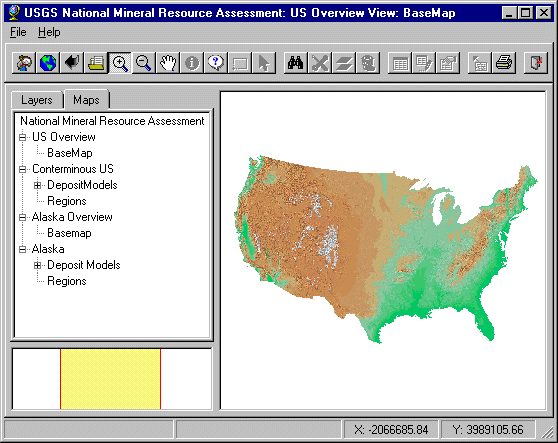
The map window consists of a menu bar and tool bar across the top, a map key on the left with tabs on the top, the map window on the right, and an index map in the lower left showing where the map window is positioned in the overview.
Doubleclicking on the Alaska layer in the key prompts the user with

Select "Yes."
The map window shows the Alaska region map. Select the Layers tab at the top of the key. Select the check box just to the left of "Besshi Massive Sulfide." Next highlight the Besshi theme in the key by selecting the paintbrush icon to the left of the checkbox. Now select the redraw tool at the left-hand end of the tool bar. This draws the Besshi tracts in the main map window. The colors of the tracts have no significance. They were chosen at random.
Select the  tool, then click on a
tract. This displays the tabular information for the tract. Put it away with
the x button.
tool, then click on a
tract. This displays the tabular information for the tract. Put it away with
the x button.
The next step will put away this user manual but you can restore it at any time by selecting the "Back" tool in the web browser window or by selecting the map browser in the taskbar at the bottom of your screen, then selecting the Help menu in the map browser.
Select the  tool. Then click on
the purple tract on the southern coast to display the rationale for the tract. In
the rationale, select any of the blue hypertext links to see tonnages, model description,
or the significant deposits list.
tool. Then click on
the purple tract on the southern coast to display the rationale for the tract. In
the rationale, select any of the blue hypertext links to see tonnages, model description,
or the significant deposits list.
The application user interface consists of:
The application interface is show below. The View frame lists the
Layer/Map views and is located in the top left frame. Below it is the Inset view showing
the location of the currently displayed map region. The large frame on the upper right is
the Map view.
 ToolBar Reference


The toolbar provides access to USGS National Mineral Resource Assessment's display, query, and analytical functions. The function of each tool is outlined below. These tools are described from left to right on the tool bar.
CD-ROM Organization and Contents
The CD-ROM contains a collection of geospatial data and associated information and is organized to allow for access to a variety of data files in a number of formats. The data directory on the CD-ROM contains ESRI shapefiles that may be used with ArcView GIS, ArcExplorer, and other GIS applications. The images used in this application are georeferenced and may be used in GIS applications as well.
The tractmaps and tables have various colors chosen at random. The specific colors have no particular significance and were chosen merely to add contrast. All the tracts of each model have the same color making it easier to separate different models plotted on the same map.
The folder names and their contents follow:
Acrobat - Acrobat installer files
databasedata - basemap shape files such as rivers, political boundaries
na - tract shape files
documentation - this user manual and associated files
html - rationales, metadata
images - splash screen and other images
install - microsoft cabinet file containing application and setup files
source_files -
Alaska rationales and references in MS Word format
Alaska models and tracts in MS Excel format
Testing
The USGS National Mineral Resource Assessment prototype testing has focused primarily on Pentium and 486 machines with 2x and faster CD-ROM readers. It has been tested under Windows NT 4.0 and Windows 95. Because PC architectures vary widely, the Map Objects application may not perform adequately on some occasions.
Although program tests have been made, no guarantee (expressed or implied) is made by the authors or the U.S. Geological Survey regarding program correctness, accuracy, or proper execution on all computer systems.
Contacts
Project chief, retired:
Richard B. McCammon 76 Roberson Rd. Sequim, WA 98382 USA Email address: mccammon@mail.olypen.com Telephone: 360-681-0521 Fax: 360-681-0527
CD-ROM compiler:
Paul Schruben U.S. Geological Survey MS 954 12201 Sunrise Valley Dr. Reston, VA 20192 Email address: pschrube@usgs.gov Telephone: 703-648-6142 Fax: 703-648-6252
Alaskan Assessment Editor:
Thomas D. Light U.S. Geological Survey 4200 University Dr. Anchorage, AK 99508 Email address: tlight@usgs.gov Telephone: 907-786-7431
The graphical browser on this CD-ROM was written in Environmental Systems
Research Institute (ESRI) MapObjects language. The USGS entered into a
contractual agreement with ESRI to write and compile the code. In return, ESRI
granted the USGS unlimited distribution rights to the compiled code but not the
source code.
This Compact Disc-Read Only Memory (CD-ROM) publication was prepared by an agency of the United States Government. Neither the United States Government nor any agency thereof, nor any of their employees, make any warranty, expressed or implied, or assumes any legal liability or responsibility for the accuracy, completeness, or usefulness of any information, apparatus, product, or process disclosed in this report, or represents that its use would not infringe privately owned rights. Reference therein to any specific commercial product, process, or service by trade name, trademark, manufacturer, or otherwise does not necessarily constitute or imply its endorsement, recommendation, or favoring by the United States Government or any agency thereof. Any views and opinions of authors expressed herein do not necessarily state or reflect those of the United States Government or any agency thereof.
Although all data and software published on this CD-ROM have been used by the USGS, no warranty, expressed or implied, is made by the U.S. Geological Survey as to the accuracy of the data and related materials and/or the functioning of the software. The act of distribution shall not constitute any such warranty, and no responsibility is assumed by the USGS in the use of this data, software, or related materials.
Graphical map depictions on this disc are intended to be used within the map scale limits applicable to the source data. Although software enables the user to show images on the disc at various scales, the user is cautioned to refer to the source documentation for the appropriate map scale limitations.
The USGS wishes to thank numerous individuals in industry, academia, and State geological organizations for their help. The State Geologists of many of the
States were particularly helpful in reviewing material that related to the significant
deposits in their State.
Credits for the Conterminous U.S.
Contributors:
National editors: Steve Ludington, Dennis Cox
Software/data managers: Paul Schruben, Barry Moring, David Sutphin
Significant deposits editors: Keith Long, John DeYoung, Dan Mosier
Regional editors: S.H.B. Clark, Michael Diggles, Alan Wallace, Leslie Cox, Steve Box
Statistician: David Root
Data technician: William Scott
Initial map digitization: Esther L. Castellanos, Martin L. Sorenson, Pamela D. Derkey, Leslie J. Cox, Garry E. Klein
Significant-deposits compilers: J.D. Bliss, A.A. Bookstrom, C.A. Carlson, L.J. Cox, W.C. Day, J.H. DeYoung, Jr., R.C. Evarts, David Frishman, R.J., Kamilli, Steve Ludington, D.L. Mosier, L.A. Moyer, Chris Osterman, M.L. Silberman, A.B. Wilson, S.H.B. Clark
Present and former USGS staff contributors: G.V. Albino, R.P. Ashley, R.A., Ayuso, W.C. Bagby, S.B. Bartsch-Winkler, B.R. Berger, R.J. Blakely, A.A. Bookstrom, S.E. Box, J.A. Briskey, Jr., C.E. Brown, M.W. Bultman, W.F. Cannon, C.A. Carlson, S.E. Church, S.H.B. Clark, C.M. Conway, D.P. Cox, L.J. Cox, J.P. D'Agostino, W.C. Day, E.H. DeWitt, M.F. Diggles, L.J. Drew, J.E. Elliott, J.G. Evans, R.C. Evarts, F.S. Fisher, M.P. Foose, E.R. Force, David Frishman, Jacob Gair, S.H. Garcia, M.E. Gettings, M.B. Goldhaber, A.E. Grosz, James Guthrie, T.F. Harms, J.J. Hemley, D.F. Huber, R.C. Jachens, B.R. Johnson, K.M. Johnson, R.J. Kamilli, T.L. Klein, M.D. Kleinkopf, R.P. Koeppen, G.L. LaBerge, C.E. Larsen, D.L. Leach, F.G. Lesure, D.A. Lindsey, B.R. Lipin, Steve Ludington, W.D. Menzie, J.T. Nash, S.W. Nicholson, C.J. Nutt, T.W. Offield, J.D. Peper, S.G. Peters, J.A. Peterson, W.J. Pickthorn, W.P. Pratt, G.S. Pitts, G.L. Raines, G.R. Robinson, J.J. Rytuba, M.G. Sawlan, K.J. Schulz, G.B. Sidder, P.K. Sims, D.A. Singer, J.F. Slack, G.T. Spanski, D.B. Stoeser, T.G. Theodore, R.M. Tosdal, W.S. Updegrove, J.G. Vietz, A.R. Wallace, J.W. Whipple, G.R. Winkler, L.G. Woodruff, M.L. Zientek, R.A. Zierenberg
Credits for the Alaska Contributors:
Project Chief: Richard B. McCammon
Editor: Thomas D. Light
Regional geologists: David A. Brew, Thomas K. Bundtzen, James L., Drinkwater, Bruce M. Gamble, Donald Grybeck, William J. Keith, Richard D. Koch, Thomas D. Light, Marti L. Miller, Warren J. Nokleberg, Jeanine M. Schmidt, Frederick H. Wilson, Warren Yeend
Geochemists: Stanley E. Church, Robert G. Eppinger, Karen D. Kelley, Richard J. Goldfarb, Richard I. Grauch, John E. Gray, James E. Kilburn, Gregory K. Lee, Cliff D. Taylor
Geophysicists: David F. Barnes, John W. Cady, David L. Campbell, Robert C. Jachens, Jeffrey D. Phillips, Richard W. Saltus
Resource analysts: Byron R. Berger, Dennis P. Cox, Larry J. Drew, W. David Menzie, Gregory T. Spanski
GIS compilation: Devon Peterson, James Hall
Reviewers: Paul B. Barton, Henry C. Berg, Donald H. Richter